IVECO HI WAY DASHBOARD
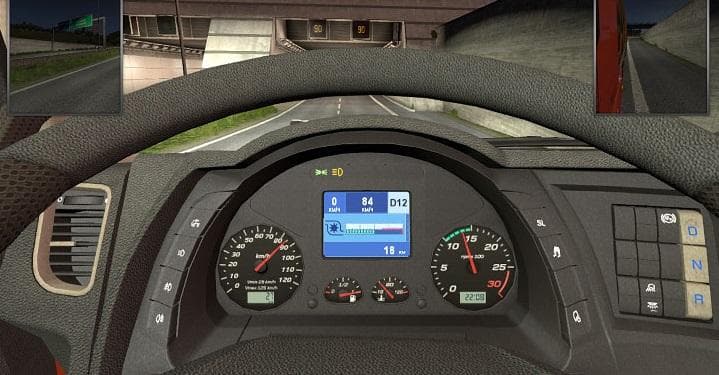
This mod for ETS2 replaces the "IVECO ECO" label on the dashboard with current speed, adds trip distance display at the bottom, and includes turbine pressure in
The IVECO HI WAY DASHBOARD mod modifies the dashboard interface of IVECO trucks in Euro Truck Simulator 2. It tweaks specific elements by removing the “IVECO ECO” label and adds useful readouts like current speed within the “IVECO ECO” zone, trip distance at the bottom of the dashboard, and turbine pressure. These changes enhance the information available directly on the truck’s dash without altering gameplay mechanics.
Parts mods such as this one focus on adding or adjusting accessories inside or outside a truck. In this case, it’s an interior part mod targeting the IVECO HI WAY model, refining its dashboard details to offer a more informative driving experience. Mods like this typically slot into the customization menu under parts or tuning sections and are designed for compatibility with the base game and other mods that don’t modify the same UI elements.
When integrating this type of parts mod into a modded setup, it's generally advisable to place it in your load order where it won’t conflict with other dashboard or UI modifications. Since it adjusts specific display features rather than core functions, it usually plays nicely alongside paint jobs, sound packs, or physics mods that don’t overlap its scope.
Drivers who prefer a deeper sense of immersion through detailed instrumentation might appreciate what this dashboard mod brings. If you’re running an IVECO HI WAY truck and want real-time feedback on your speed zones, trip data, and engine turbine pressure without switching views or menus, this mod can be a practical addition to your cab environment.
How to install
1. Download the file(s) from the original source linked above. 2. Drop them into `Documents/Euro Truck Simulator 2/mod/`. 3. Enable in Mod Manager and restart the game.
After the mod loads, save your game inside a safe area (parking lot or service) before deciding whether to keep it. If the game refuses to load with the mod enabled, check that all required DLCs are installed and that the supported ETS2 version chips on this page include your installed game patch.
Reviews
No ratings yetNo reviews yet — be the first to rate this mod.