IVECO AS2 EURO 5 1.19
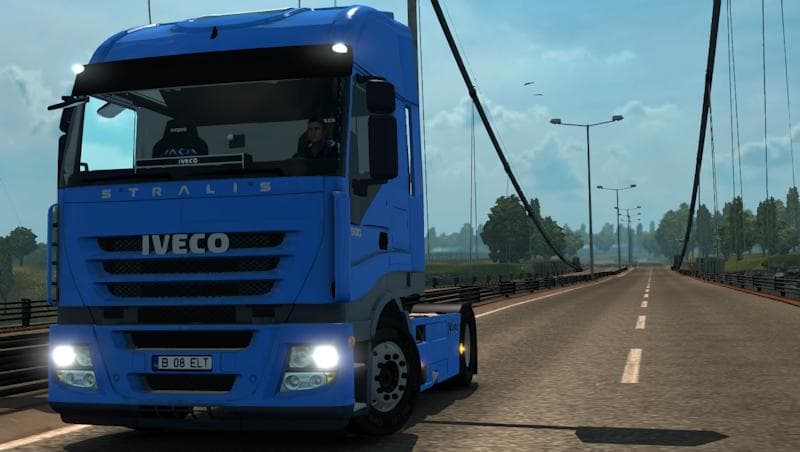
The IVECO AS2 EURO 5 1.19 mod adds a new truck to Euro Truck Simulator 2 that you can buy and drive from dealerships. It features its own wheels and interior, including lighting, which makes the cab feel more immersive compared to standard trucks. This kind of mod usually comes with custom engine and transmission options, allowing for a tailored driving experience that fits your style.
Truck mods like this one replace or add drivable vehicles in ETS2, giving players more variety beyond the base game’s selection. They typically include unique paint slots so you can customize the look of your truck while maintaining compatibility with other visual mods. Since it’s designed for game version 1.19, it should work smoothly without causing conflicts if your setup matches that version.
In a modded environment, adding the IVECO AS2 EURO 5 fits well alongside map and cargo mods since it operates as a standalone truck purchasable at dealers. Load order matters when using multiple truck mods; usually, you want to keep them separate or prioritize certain ones to avoid overlapping files or textures. Because this mod has its own interior and wheels, it’s less likely to clash with generic parts used by other trucks.
Players who prefer driving European-style cabs or want more authenticity in their fleet might appreciate this addition. It offers a distinct alternative to the default trucks and is ideal for those who enjoy experimenting with different vehicle types while keeping their game visually interesting.
Installing truck mods like this involves placing the .scs file into your mod folder and enabling it through the ETS2 menu. Make sure you’re running version 1.19 of the game to ensure compatibility since mismatched versions often lead to issues such as missing textures or crashes.
Overall, this mod is a straightforward way to expand your vehicle options with a detailed IVECO model that stands out due to its own custom assets and interior lighting effects.
How to install
1. Download the .scs file from the original source linked above. 2. Copy the file to `Documents/Euro Truck Simulator 2/mod/`. 3. Launch ETS2, open the Mod Manager from the main menu, enable the mod, restart the game. 4. Visit any truck dealer to spawn the new truck.
After the mod loads, save your game inside a safe area (parking lot or service) before deciding whether to keep it. If the game refuses to load with the mod enabled, check that all required DLCs are installed and that the supported ETS2 version chips on this page include your installed game patch.
Reviews
No ratings yetNo reviews yet — be the first to rate this mod.





![Fuso Supergreat Hi Cab Truck [1.50 – 1.60] – Trucks mod for Euro Truck Simulator 2](/_next/image?url=https%3A%2F%2F802software.s3.us-east-1.amazonaws.com%2Fets2modspot%2Fscreenshots%2F7494%2F0.jpg&w=3840&q=75)