IRANIAN FLAG ACCESSORIES
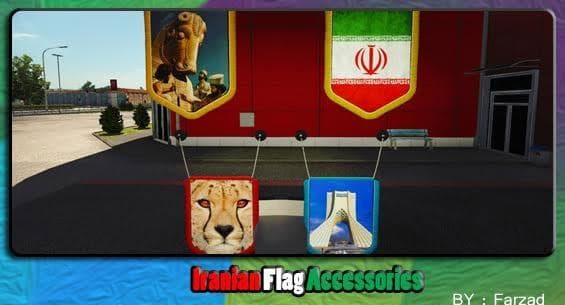
IRANIAN FLAG ACCESSORIES is an ETS2 skins. Listed compatible with ETS2 1.21.
The IRANIAN FLAG ACCESSORIES mod is a skin pack designed for Euro Truck Simulator 2 that applies Iranian flag-themed visuals to compatible trucks. Skins like this one repaint the exterior of existing vehicles without altering their shape or model, so they’re added directly in the paint shop of the game. This particular mod includes HD and UltraHD textures along with updated materials, which help enhance the detail and realism of the flag designs on your truck’s surfaces.
Skin mods typically rely on a specific base vehicle to work correctly, meaning you need to have the supported truck model in your game for these accessories to appear properly. Since this mod was tested on ETS2 version 1.21.1, it fits well into setups running around that version but might require compatibility checks if used with newer game updates or other mods. Load order can be important; generally, skins should be placed after map or gameplay mods to avoid conflicts.
Adding national flag accessories like this one can personalize your trucking experience and show off a bit of cultural pride while driving across Europe’s highways. For those who enjoy collecting diverse skins or want a unique touch on their rig, such mods offer a straightforward way to customize your fleet without changing gameplay mechanics.
While the creator remains unknown and exact file size details aren’t specified, players familiar with installing skin mods will find this pack easy to integrate using standard procedures—typically involving placing files in the mod folder and activating them through the game’s mod manager interface.
This kind of mod is particularly appealing if you prefer detailed graphics enhancements over structural changes and want to add visual variety without risking stability issues from more complex modifications. It slots nicely alongside other cosmetic packs that do not alter performance but boost immersion through appearance.
How to install
1. Download the .scs file. 2. Drop it into `Documents/Euro Truck Simulator 2/mod/`. 3. Enable in Mod Manager. 4. Apply the skin in the truck/trailer paint shop.
After the mod loads, save your game inside a safe area (parking lot or service) before deciding whether to keep it. If the game refuses to load with the mod enabled, check that all required DLCs are installed and that the supported ETS2 version chips on this page include your installed game patch.
Reviews
No ratings yetNo reviews yet — be the first to rate this mod.