Hungary Map
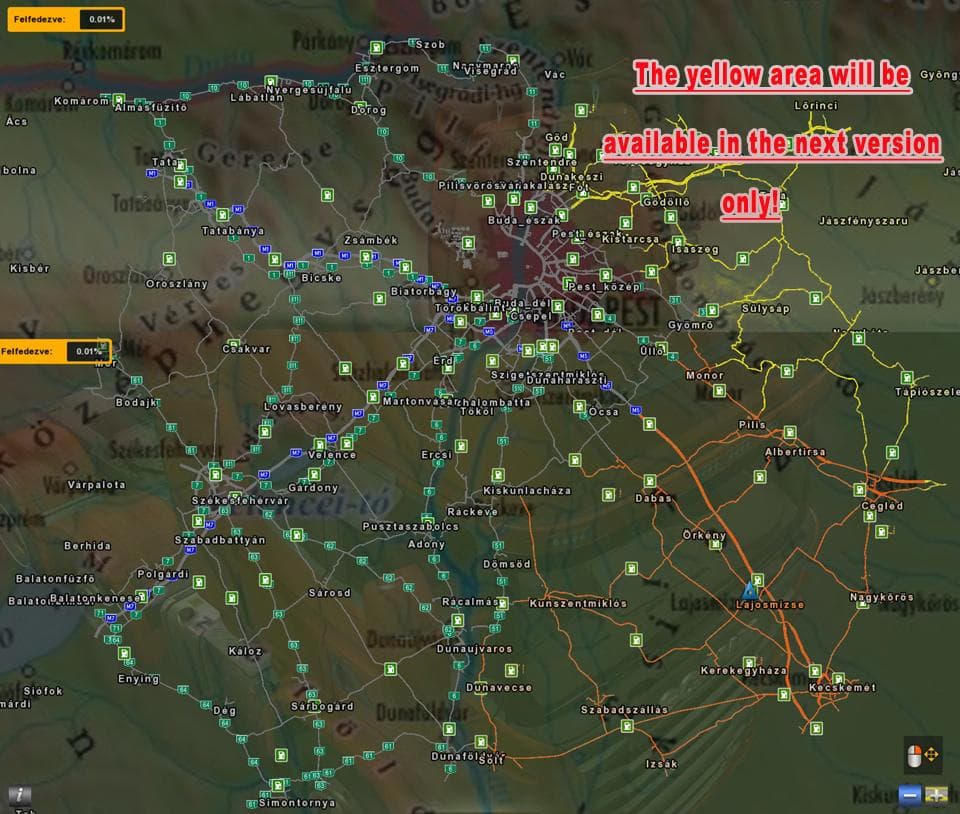
The "Hungary Map - ETS2 mods download" is a map mod for Euro Truck Simulator 2, version 0.9.25. It adds new cities such as DUNAVECSE, SOLT, KECSKEMÉT, and more
Hungary Map is a map mod for Euro Truck Simulator 2 that introduces several new cities into the game, including places like Dunavecse, Kecskemét, and Cegléd. This expansion adds more variety to the Hungarian road network and offers fresh routes for players who enjoy exploring or hauling cargo in this part of Europe. By incorporating these locations, it broadens the scope of driving experiences within Hungary's region.
Map mods like this one work by adding or reshaping the existing drivable world with new roads, towns, and sometimes entire regions. They typically come packaged as .scs files that you place in your ETS2 mod folder. Because these mods modify the map itself, they are sensitive to load order and might require starting a new profile or having certain base map DLCs installed for proper functionality.
When used in a modded setup, Hungary Map fits well alongside other regional or country-specific map expansions such as Austria or Slovakia mods. It's wise to check compatibility and load order since conflicts can arise if multiple map mods overlap geographically or try to change similar areas. Players often put this kind of mod lower in the load order after core map packs but before cosmetic additions.
This mod is suited for those who want to deepen their experience of trucking through Hungary or add more detailed destinations to their journeys across Central Europe. If you already use several map extensions and want more diversity in your routes around this region, it could be a solid choice to expand your game's world.
How to install
1. Download every .scs file from the source page (map mods often ship multiple files). 2. Copy all files to `Documents/Euro Truck Simulator 2/mod/`. 3. Enable each file in Mod Manager **in the order documented by the modder**. Load order matters for maps. 4. Start a new save or use an existing save that already supports the map's base regions.
After the mod loads, save your game inside a safe area (parking lot or service) before deciding whether to keep it. If the game refuses to load with the mod enabled, check that all required DLCs are installed and that the supported ETS2 version chips on this page include your installed game patch.
Known conflicts
No conflicts reported for this mod yet. Running a big mod list? Check your whole setup for conflicts →
Reviews
No ratings yetNo reviews yet — be the first to rate this mod.





