HINO 500 BY S.M.T
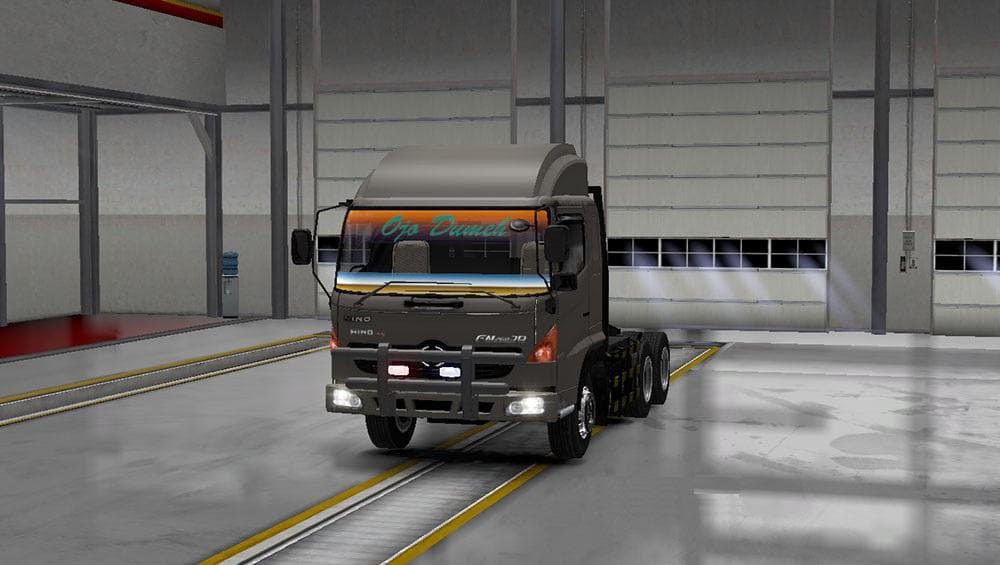
The "HINO 500 BY S.M.T" mod for ETS2 adds a truck with 5-6 chassis options, 2 cabins, and numerous accessories. It can be found in the Mercedes Dealer and credi
The HINO 500 BY S.M.T mod adds a new truck to Euro Truck Simulator 2, letting players drive the HINO 500 model within the game. This truck comes with multiple chassis options and two cabin styles, giving some variety in how you customize your rig. Accessories are also included, which lets you tweak the look and functionality to better fit your preferences. The truck can be found at the Mercedes dealer in-game, making it easy to purchase once you've installed the mod.
Truck mods like this one bring fresh vehicles into ETS2 by adding new drivable cabs and chassis that you can buy from dealers. These mods usually feature their own interiors, engines, transmissions, and paint jobs so they feel like a genuine addition rather than just a reskin. Installing such mods typically involves placing files into the correct mod folder and activating them through the game’s mod manager.
When using truck mods in a setup with other vehicle or map modifications, it's wise to consider load order carefully. Truck mods generally load without conflicts if placed after map mods but before any AI traffic overhauls or sound packs that might affect vehicle behavior. Since details on compatibility for this specific mod are unknown, keeping backups before testing is a good idea.
This kind of mod suits players who want to expand their garage with unique trucks beyond what ETS2 offers by default. If you enjoy customizing your rigs or want to experience driving something less common in the base game, adding the HINO 500 offers a different option for long hauls across Europe or American-themed maps.
How to install
1. Download the .scs file from the original source linked above. 2. Copy the file to `Documents/Euro Truck Simulator 2/mod/`. 3. Launch ETS2, open the Mod Manager from the main menu, enable the mod, restart the game. 4. Visit any truck dealer to spawn the new truck.
After the mod loads, save your game inside a safe area (parking lot or service) before deciding whether to keep it. If the game refuses to load with the mod enabled, check that all required DLCs are installed and that the supported ETS2 version chips on this page include your installed game patch.
Reviews
No ratings yetNo reviews yet — be the first to rate this mod.