Grand Utopia Map v1.20c 1.60
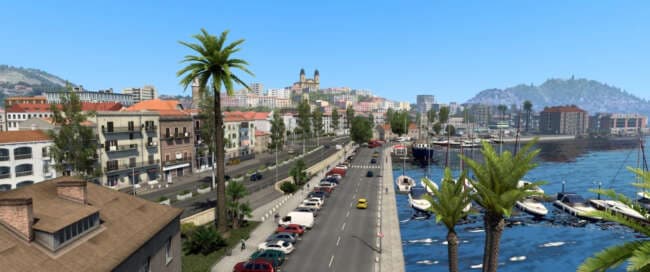
The Grand Utopia Map v1.20c 1.60 is a minor update for ETS2, fixing bugs and errors while adding a new underground depot under the Utopia stadium. Created by et
Grand Utopia Map v1.20c 1.60 is a map mod that extends the drivable world in Euro Truck Simulator 2, offering new areas and features for players to explore. This update focuses on fixing bugs and errors while adding a new underground depot beneath the Utopia stadium, enhancing the overall experience within the modded environment. Map mods like this one modify or expand existing regions by introducing fresh roads, cities, and landmarks, which can change how you plan your routes across ETS2's virtual landscape.
These kinds of maps usually come as .scs files and require careful attention to load order to function correctly alongside other mods. It's common for map mods to demand a specific base-map DLC or even a fresh game profile for optimal stability, so users should check compatibility before integrating Grand Utopia Map into their setup. Given its version support for ETS2 versions 1.20 and 1.60, this mod fits well with players running those game editions.
In a modded setup, Grand Utopia Map can complement other map expansions or realism mods by adding more variety and depth to your journeys. Players who enjoy exploring beyond standard routes will find value here, especially those interested in discovering new locations within the expanded territory it offers. The inclusion of an underground depot adds an interesting feature that may appeal to users looking for detailed city elements within their maps.
This mod is suited for players who like having larger worlds to drive through without straying too far from official content compatibility. Truckers who engage with virtual trucking companies (VTC) might also appreciate its support for activating related features around the new depot area. Overall, it’s a solid choice for anyone seeking extended exploration options in ETS2’s map category.
How to install
1. Download every .scs file from the source page (map mods often ship multiple files). 2. Copy all files to `Documents/Euro Truck Simulator 2/mod/`. 3. Enable each file in Mod Manager **in the order documented by the modder**. Load order matters for maps. 4. Start a new save or use an existing save that already supports the map's base regions.
After the mod loads, save your game inside a safe area (parking lot or service) before deciding whether to keep it. If the game refuses to load with the mod enabled, check that all required DLCs are installed and that the supported ETS2 version chips on this page include your installed game patch.
Known conflicts
No conflicts reported for this mod yet. Running a big mod list? Check your whole setup for conflicts →
Reviews
No ratings yetNo reviews yet — be the first to rate this mod.





