Gertzen Transporte v2.0
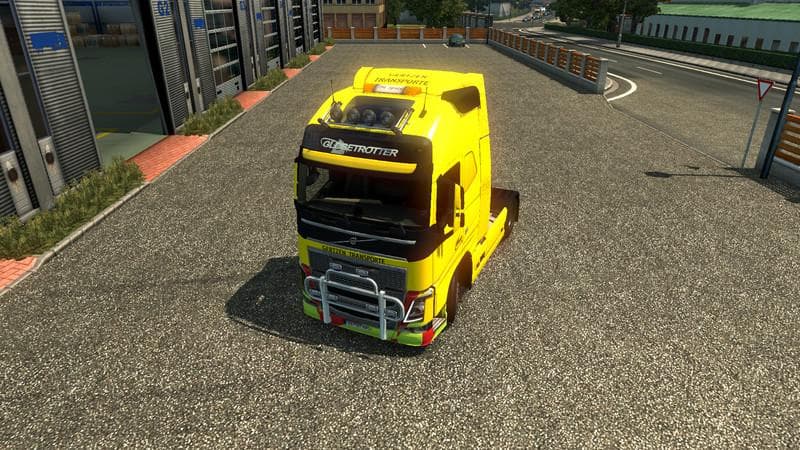
Gertzen Transporte is a skin mod for ETS2 version 2.0 created by Euro Truck Simulator 2. It features company skins for Autokrane Gertzen Transport based in Emsl
Gertzen Transporte v2.0 is a skin mod for Euro Truck Simulator 2 that offers a repaint themed around the Gertzen forwarding company based in Emsland. Rather than altering the truck model itself, this type of mod changes the visual appearance by applying a new paint job to an existing vehicle. You’ll find these skins available through the paint shop within ETS2, where they depend on specific base trucks or trailers to function properly.
Skin mods like this one let players personalize their fleet with liveries representing real or fictional transport companies without affecting gameplay mechanics or truck performance. They fit neatly into a modded setup as cosmetic enhancements, allowing you to create a more immersive trucking experience or show off your favorite brands and designs on the road.
When using skins alongside other mods, it’s worth paying attention to load order since skins generally load after truck model mods but before gameplay changes. This ensures that your custom paints appear correctly without conflicts. As with most skin mods, compatibility depends heavily on matching the skin to the right vehicle variant to avoid any visual glitches.
Players who enjoy roleplaying or want their trucks to stand out will appreciate adding Gertzen Transporte's livery to their collection. It’s particularly suitable if you’re interested in German transport companies or want a touch of regional flavor from Emsland on your virtual hauls. Given its straightforward nature, it blends well with various setups including those focused on realism and company immersion.
How to install
1. Download the .scs file. 2. Drop it into `Documents/Euro Truck Simulator 2/mod/`. 3. Enable in Mod Manager. 4. Apply the skin in the truck/trailer paint shop.
After the mod loads, save your game inside a safe area (parking lot or service) before deciding whether to keep it. If the game refuses to load with the mod enabled, check that all required DLCs are installed and that the supported ETS2 version chips on this page include your installed game patch.
Reviews
No ratings yetNo reviews yet — be the first to rate this mod.