Froeslev Wood Trailer
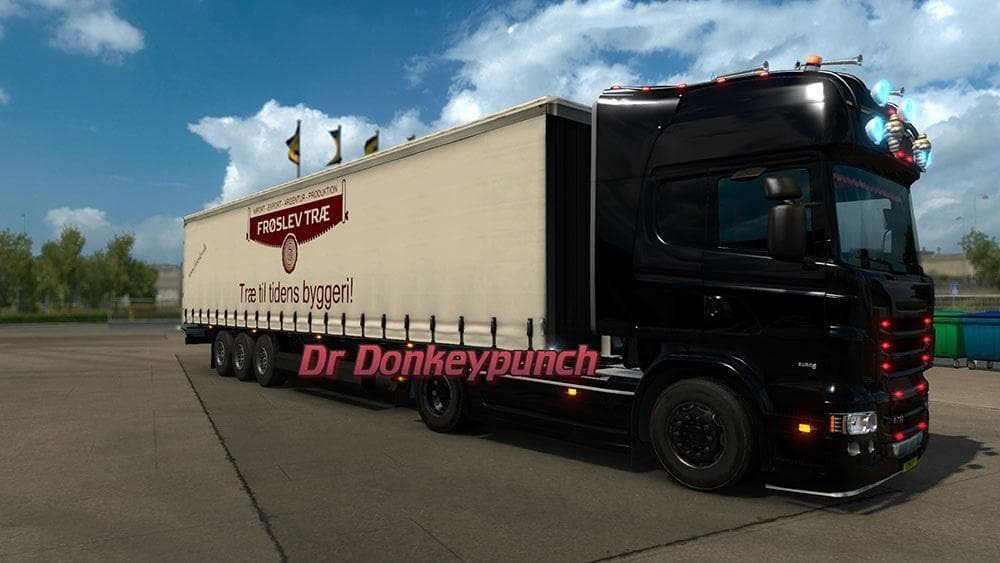
The Froeslev Wood Trailer is a standalone trailer mod for ETS2 with AI Traffic enabled. Created by Euro Truck Simulator 2, the mod includes a file size of 9.6 M
The Froeslev Wood Trailer adds a new standalone trailer to Euro Truck Simulator 2, designed for hauling wood cargo. This mod functions like other trailer mods by introducing an additional haulable trailer that appears in the cargo selection and can be purchased from the trailer dealer. It supports AI traffic, meaning you'll see it driven around by computer-controlled trucks as well as being available for your own use.
Trailer mods such as this one expand your options on the road by offering different types of trailers or cargo to transport. They fit into modded setups by slotting into your existing fleet without replacing base game assets, so you can mix and match with other truck or map mods. Since this is a standalone trailer, it should have minimal conflicts with other mods, but it's good practice to load trailers before map mods to avoid any potential issues.
Users who enjoy diversifying their hauling experience will find this trailer useful for adding variety to their deliveries. It's particularly fitting for players who focus on forestry or wood-related cargo runs, providing a fresh option beyond the default game trailers. If you run a modded profile with multiple trailers and cargo types, this addition helps keep things interesting while staying compatible with standard ETS2 versions.
Overall, the Froeslev Wood Trailer integrates smoothly into most mod collections thanks to its standalone design and AI traffic compatibility. It offers another way to expand your trucking routes without needing complicated setups or worrying about interfering with other parts of your game.
While specific version compatibility isn't listed, typical trailer mods work across many recent ETS2 versions once installed correctly through the mod manager. Just remember to activate it before starting your profile and check load order if you use several trailer mods together.
How to install
1. Download the .scs file. 2. Drop it into `Documents/Euro Truck Simulator 2/mod/`. 3. Enable in Mod Manager. 4. Trailer should appear in cargo selection or trailer dealer depending on the mod's design.
After the mod loads, save your game inside a safe area (parking lot or service) before deciding whether to keep it. If the game refuses to load with the mod enabled, check that all required DLCs are installed and that the supported ETS2 version chips on this page include your installed game patch.
Reviews
No ratings yetNo reviews yet — be the first to rate this mod.





