DAF XF SC 105
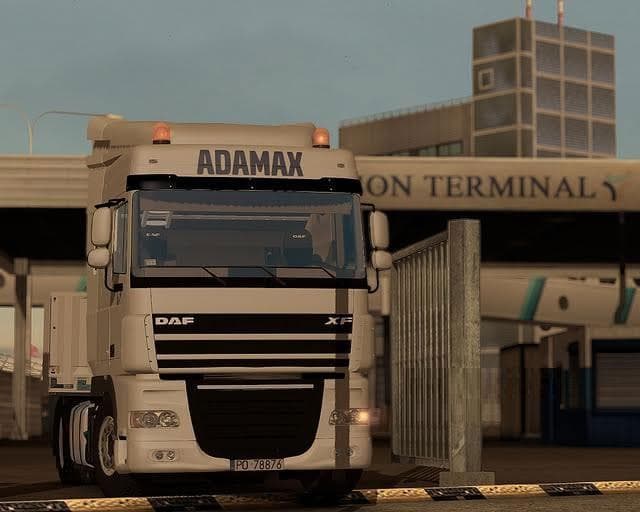
The DAF XF SC 105 mod adds a 4x2 chassis DAF truck with two beacons, new engine options, and detailed interior elements. Created by Euro Truck Simulator 2, this
The DAF XF SC 105 is a truck mod that adds a drivable 4x2 chassis model to Euro Truck Simulator 2. This type of mod typically introduces a new cab with its own interior, engine options, and paint slots, allowing players to expand their fleet beyond the base game trucks. The DAF XF SC 105 comes with a detailed interior and several engine variants, along with two beacon lights for added realism.
Truck mods like this one are purchased at dealers within ETS2 and slot into the game's vehicle selection just like official trucks. They often feature unique visual details and configurations that can enhance the driving experience or fit certain haul scenarios better than default options. This particular mod focuses on capturing some specifics of the DAF XF series, including its cabin design and engines.
When used alongside other truck mods or map expansions, it's wise to pay attention to load order since conflicts can occur if multiple mods alter similar files. Usually, placing newer truck mods lower in the load order helps prevent issues, but exact steps depend on your whole mod list. Compatibility may also be influenced by the ETS2 version you are running, so checking for updates or user feedback is recommended.
This mod fits well into setups aiming for greater variety in their garage or those interested in driving European-style trucks. It provides an alternative cab option if you're looking for something different from the standard roster without straying too far from familiar vehicle styles.
Players who enjoy customizing their rigs or simulating specific trucking brands will likely find this mod worth trying out. It offers extra choices for engine tuning and visual detail that can complement existing mods focused on map or cargo enhancements.
How to install
1. Download the .scs file from the original source linked above. 2. Copy the file to `Documents/Euro Truck Simulator 2/mod/`. 3. Launch ETS2, open the Mod Manager from the main menu, enable the mod, restart the game. 4. Visit any truck dealer to spawn the new truck.
After the mod loads, save your game inside a safe area (parking lot or service) before deciding whether to keep it. If the game refuses to load with the mod enabled, check that all required DLCs are installed and that the supported ETS2 version chips on this page include your installed game patch.
Reviews
No ratings yetNo reviews yet — be the first to rate this mod.





![Fuso Supergreat Hi Cab Truck [1.50 – 1.60] – Trucks mod for Euro Truck Simulator 2](/_next/image?url=https%3A%2F%2F802software.s3.us-east-1.amazonaws.com%2Fets2modspot%2Fscreenshots%2F7494%2F0.jpg&w=3840&q=75)