DAF XF EURO 6 BLUE CARBON V1.1
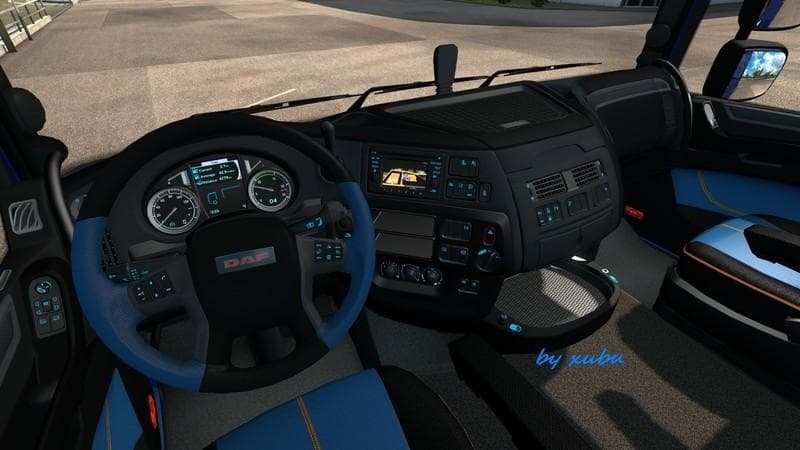
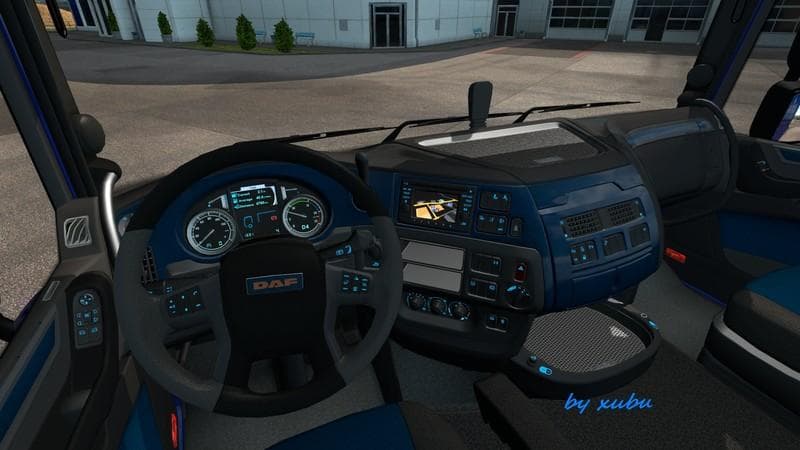
This mod adds version 1.1 of the DAF XF Euro 6 Blue Carbon interior skin to ETS2, with improved textures and mod manager support. It has been tested with ETS2 v
This mod offers a repaint for the DAF XF Euro 6 truck, focusing on a blue carbon theme that updates the interior's look. It doesn't change the model itself but modifies the textures to give the cabin a distinct feel with a darker bed texture included. The update to version 1.1 brings some usability improvements like displaying pictures and text in the mod manager, helping with identification among other mods.
Skin mods like this one are applied through the paint shop in Euro Truck Simulator 2. They rely on having the base vehicle installed since they simply repaint or retexture it without altering any mechanical or structural aspects of the truck. This means you can easily switch between different skins if you want to vary your truck’s appearance without installing multiple separate trucks.
In a heavily modded setup, skins usually come late in the load order to ensure they override any default textures but don't conflict with larger vehicle modifications. Since this mod supports ETS2 version 1.1, compatibility is generally smooth for setups around that game version, though users should verify whether newer game versions might require updated skin files or cause display issues.
Truck enthusiasts who enjoy personalizing their rigs will find this skin useful if they prefer subtle yet noticeable changes inside their cab environment. The blue carbon interior provides a different atmosphere compared to standard interiors and can enhance immersion during long hauls across European roads.
Because skins do not affect gameplay mechanics, they're low risk in terms of causing crashes or performance drops. Still, always back up your profiles before adding new mods and check that your existing mods don't overwrite each other's files, especially if multiple skins are used simultaneously.
How to install
1. Download the .scs file. 2. Drop it into `Documents/Euro Truck Simulator 2/mod/`. 3. Enable in Mod Manager. 4. Apply the skin in the truck/trailer paint shop.
After the mod loads, save your game inside a safe area (parking lot or service) before deciding whether to keep it. If the game refuses to load with the mod enabled, check that all required DLCs are installed and that the supported ETS2 version chips on this page include your installed game patch.
Reviews
No ratings yetNo reviews yet — be the first to rate this mod.