CZ & SK MAP ADDON 1.18
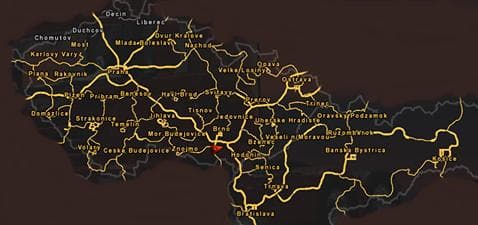
The CZ & SK Map Addon 1.18 expands the driving area in Euro Truck Simulator 2 by adding new cities within Czechia and Slovakia. This map mod is designed for ETS2 version 1.18, fitting neatly into your existing game environment if you’re running that same version. Mods like this one typically come as .scs files that you place in your mod folder and activate through the game's mod manager.
Map mods such as this add-on increase the variety of routes and destinations available to players, enhancing the sense of exploration and challenge. By introducing additional urban areas, it provides more delivery points and can refresh gameplay for those who have extensively traveled the base map or other expansions. It’s a solid choice if you want more content without changing the overall style of the original game world.
When using map expansions, load order becomes important to prevent conflicts with other mods or base maps. Usually, these addons require a clean profile or compatibility with certain DLCs related to regions covered by the mod. Players should check compatibility notes when combining multiple map mods to avoid issues like missing textures or unreachable locations.
This particular addon focuses on Central Europe, specifically Czechia and Slovakia, complementing other European map mods or DLCs that cover neighboring countries like Austria or Poland. If your setup already includes larger map packs or regional expansions around this area, adding these cities can make your logistics network feel more complete.
Players interested in exploring more of Central Europe will find this mod useful for increasing immersion and mission variety without straying far from official territory. It's especially suited for those who enjoy long-haul trucking across interconnected cities within familiar European landscapes.
Installing this kind of mod is straightforward but requires attention to version matching; since it's made for ETS2 1.18, using it on other versions could cause crashes or errors. Like most map addons, activating it via the game's mod manager after placing it correctly ensures it loads properly alongside other active mods.
How to install
1. Download every .scs file from the source page (map mods often ship multiple files). 2. Copy all files to `Documents/Euro Truck Simulator 2/mod/`. 3. Enable each file in Mod Manager **in the order documented by the modder**. Load order matters for maps. 4. Start a new save or use an existing save that already supports the map's base regions.
After the mod loads, save your game inside a safe area (parking lot or service) before deciding whether to keep it. If the game refuses to load with the mod enabled, check that all required DLCs are installed and that the supported ETS2 version chips on this page include your installed game patch.
Known conflicts
No conflicts reported for this mod yet. Running a big mod list? Check your whole setup for conflicts →
Reviews
No ratings yetNo reviews yet — be the first to rate this mod.





