CUSTOM LARGE GARAGE TYPE A
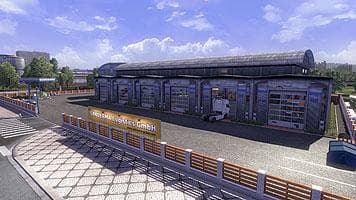
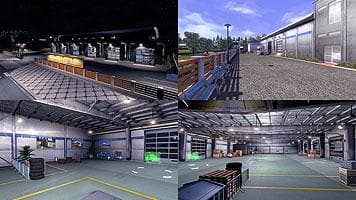
CUSTOM LARGE GARAGE TYPE A adds a new garage option to Euro Truck Simulator 2, expanding the locations where players can store and manage their trucks and trailers. This mod falls under the maps category, which typically introduces new areas or modifies existing ones by adding structures like garages or service stations. By including this type of garage, it provides players with more flexibility in organizing their fleet within the game world.
Map mods in ETS2 often come as .scs files that need to be loaded in a specific order to avoid conflicts with other map expansions or base game content. Since this mod targets version 1.18 of ETS2, users should ensure compatibility with their current setup before activating it. Sometimes such map additions require starting a fresh profile or having certain base map DLCs installed for everything to function correctly.
Adding a large garage can fit well into a heavily modded environment where players run multiple trucks and trailers simultaneously. It offers extra space for vehicle storage, potentially reducing travel time between missions if placed strategically on the map. Players who have expanded their game world with various map mods might appreciate the convenience of an additional custom garage option.
Because this mod changes how garages appear on the map, its position in the load order matters. Placing it too low might cause it not to load properly or get overwritten by other map mods. It's advisable to test different load orders and back up profiles when using multiple map-related modifications together.
Truckers who enjoy managing a sizable fleet or want more variety in garage locations could find CUSTOM LARGE GARAGE TYPE A useful. It doesn't add new roads or cities but complements those types of expansions by enhancing where you can park and maintain your vehicles within ETS2.
How to install
1. Download every .scs file from the source page (map mods often ship multiple files). 2. Copy all files to `Documents/Euro Truck Simulator 2/mod/`. 3. Enable each file in Mod Manager **in the order documented by the modder**. Load order matters for maps. 4. Start a new save or use an existing save that already supports the map's base regions.
After the mod loads, save your game inside a safe area (parking lot or service) before deciding whether to keep it. If the game refuses to load with the mod enabled, check that all required DLCs are installed and that the supported ETS2 version chips on this page include your installed game patch.
Known conflicts
No conflicts reported for this mod yet. Running a big mod list? Check your whole setup for conflicts →
Reviews
No ratings yetNo reviews yet — be the first to rate this mod.





