COLOR MAP OF EUROPE
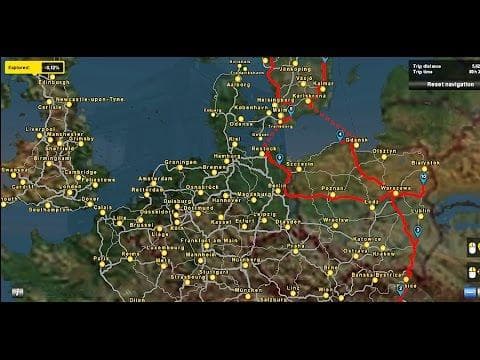
COLOR MAP OF EUROPE is a map mod for ETS2 version 1.21 that changes the standard color map of Europe and Scandinavia. Created by Euro Truck Simulator 2, it has
This mod offers a new take on the standard color scheme used for the map of Europe and Scandinavia in Euro Truck Simulator 2. By altering the usual colors, it changes how regions and countries appear visually on the in-game map. This kind of modification is part of the broader category of map mods, which enhance or alter the driving world by adding or tweaking roads, cities, and entire regions.
Map mods like this one typically come as .scs files that you add to your ETS2 mod folder. Since they're load-order sensitive, placing them correctly alongside other map mods or official DLCs matters to avoid conflicts or crashes. Sometimes these mods require starting a fresh profile or having specific base maps installed, depending on their scope and compatibility.
The version support here is for ETS2 1.21, which means it's designed with that release in mind and may not work properly with later updates unless adjusted by the modder. Changing the color scheme doesn't add new locations but can make navigating easier or more visually appealing for players who spend a lot of time plotting routes across countries like Germany, France, Poland, and others covered by this mod.
Players who run heavily modded setups with multiple map expansions might find this useful to distinguish between different areas more clearly at a glance. It fits well alongside other regional mods that focus on places such as Austria, Belgium, or the Balkans without overriding any major game mechanics.
If you prefer a different aesthetic for your in-game navigation tools or want to refresh your experience without altering gameplay elements significantly, this map color tweak could be worth trying out. It’s a subtle change but one that can impact how you perceive distances and borders during long hauls across Europe.
How to install
1. Download every .scs file from the source page (map mods often ship multiple files). 2. Copy all files to `Documents/Euro Truck Simulator 2/mod/`. 3. Enable each file in Mod Manager **in the order documented by the modder**. Load order matters for maps. 4. Start a new save or use an existing save that already supports the map's base regions.
After the mod loads, save your game inside a safe area (parking lot or service) before deciding whether to keep it. If the game refuses to load with the mod enabled, check that all required DLCs are installed and that the supported ETS2 version chips on this page include your installed game patch.
Known conflicts
No conflicts reported for this mod yet. Running a big mod list? Check your whole setup for conflicts →
Reviews
No ratings yetNo reviews yet — be the first to rate this mod.





