BUNDESWEHR SKIN PACK FOR MAN TGX
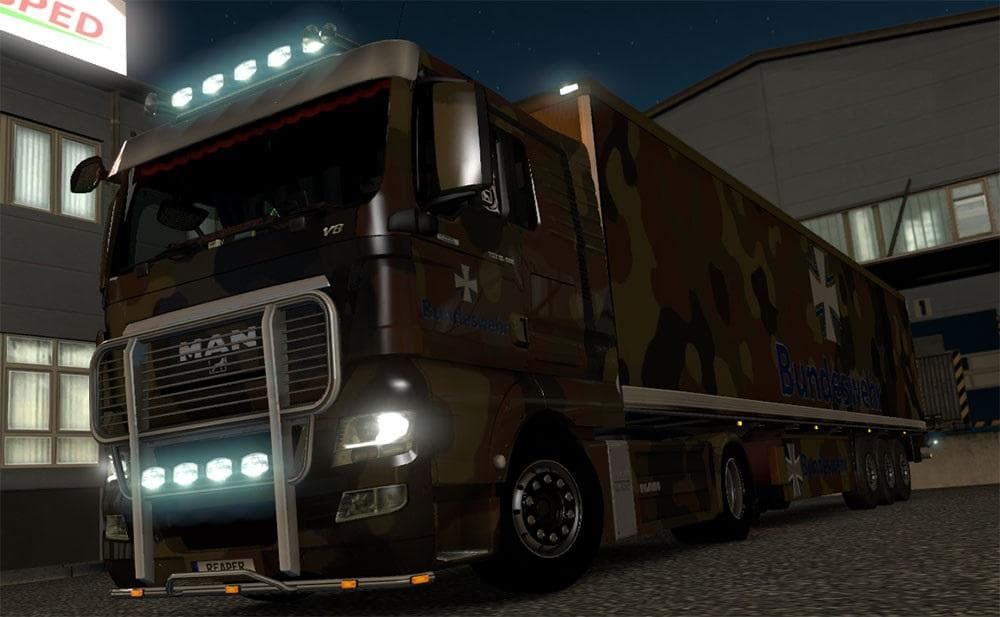
This skin pack for MAN TGX includes Flecktarn skins for the truck and trailers of PoSped Company. Created by Euro Truck Simulator 2, the mod adds a military-ins
The BUNDESWEHR SKIN PACK FOR MAN TGX offers a distinctive repaint option for the MAN TGX truck and related trailers in Euro Truck Simulator 2. This mod features a Flecktarn camouflage pattern, which is applied both to the truck itself and to trailers associated with the PoSped company, effectively replacing their default appearance. Skin mods like this one don't alter the truck's model or performance; instead, they change its visual style by adding new paint jobs accessible through the game's paint shop.
Skin mods generally rely on the base vehicle they were designed for, so it's essential that you own the compatible MAN TGX truck to use this pack. Since it changes skins rather than models, it usually fits well into a modded setup without causing conflicts with gameplay or physics mods. However, skin packs sometimes overwrite existing paint jobs, meaning if you have other trailer skins for PoSped trailers, those might be replaced when loading this mod.
Load order isn't typically complex for skin mods; placing them near the end of your mod list is often enough to ensure their textures appear properly over any conflicting assets. That said, if you run multiple skin packs affecting the same vehicles or trailers, you may need to adjust load priority to decide which skin shows up in-game.
This particular skin pack will appeal mostly to players who enjoy customizing their trucks with military-inspired designs or those interested in German themes within ETS2. It adds a layer of authenticity if you're aiming for a Bundeswehr look while driving across European roads in your MAN TGX.
Because it focuses on repainting existing models rather than altering gameplay elements, this mod is straightforward to install and use. It complements setups that already include various cosmetic mods and can help diversify your fleet's appearance without impacting performance or compatibility with map expansions or cargo mods.
How to install
1. Download the .scs file. 2. Drop it into `Documents/Euro Truck Simulator 2/mod/`. 3. Enable in Mod Manager. 4. Apply the skin in the truck/trailer paint shop.
After the mod loads, save your game inside a safe area (parking lot or service) before deciding whether to keep it. If the game refuses to load with the mod enabled, check that all required DLCs are installed and that the supported ETS2 version chips on this page include your installed game patch.
Reviews
No ratings yetNo reviews yet — be the first to rate this mod.