BIG RUSSIAN TRAILERS PACK
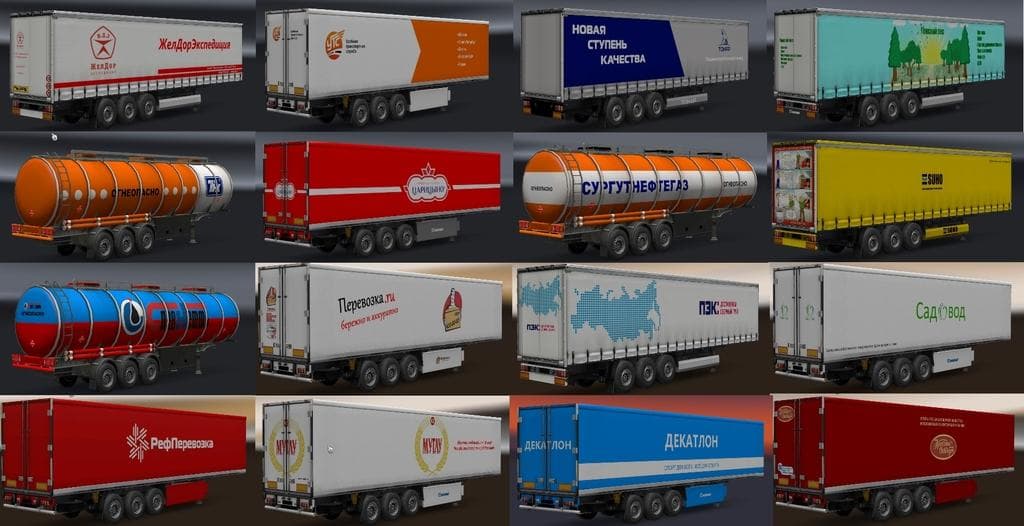
The BIG RUSSIAN TRAILERS PACK is a mod for Euro Truck Simulator 2 that adds over 80 trailers with about 90 skins representing brands from Russia, Belarus, Kazak
The BIG RUSSIAN TRAILERS PACK adds a sizable collection of trailers themed around Russia and nearby regions like Belarus, Kazakhstan, and Dagestan. This pack includes over 80 different trailers featuring about 90 skins that represent various trailer brands from these areas. It expands the types of haulable trailers available in Euro Truck Simulator 2, enriching the cargo selection and trailer dealer inventory with options not found in the base game.
Trailer mods like this one generally introduce new ownable trailer bodies or cargo types that players can purchase and use throughout their trucking career. Installing such mods allows you to diversify your fleet and experience hauling loads with a regional flavor distinct from standard trailers. Since this mod focuses on trailers from Eastern Europe and Central Asia, it complements setups aiming to replicate trucking routes in those parts of the game map or mods expanding those territories.
When incorporating multiple trailer mods into your setup, it's wise to pay attention to load order since conflicts can arise if two mods overwrite similar assets or data entries. Trailer packs typically need to be loaded carefully alongside map or cargo mods to ensure compatibility. Users often place large trailer collections either near the top or bottom of their mod list depending on other active content to avoid issues.
This pack is suited for players who want to add more authenticity when driving in Russia, Kazakhstan, Belarus, or surrounding regions within ETS2. Fans of regional content and those running map expansions covering these countries will find it useful. The diverse range of trailer skins also appeals to those who enjoy visual variety in their haulable equipment without altering gameplay mechanics drastically.
How to install
1. Download the .scs file. 2. Drop it into `Documents/Euro Truck Simulator 2/mod/`. 3. Enable in Mod Manager. 4. Trailer should appear in cargo selection or trailer dealer depending on the mod's design.
After the mod loads, save your game inside a safe area (parking lot or service) before deciding whether to keep it. If the game refuses to load with the mod enabled, check that all required DLCs are installed and that the supported ETS2 version chips on this page include your installed game patch.
Reviews
No ratings yetNo reviews yet — be the first to rate this mod.





