ARMY COMBO PACK 1.21.X
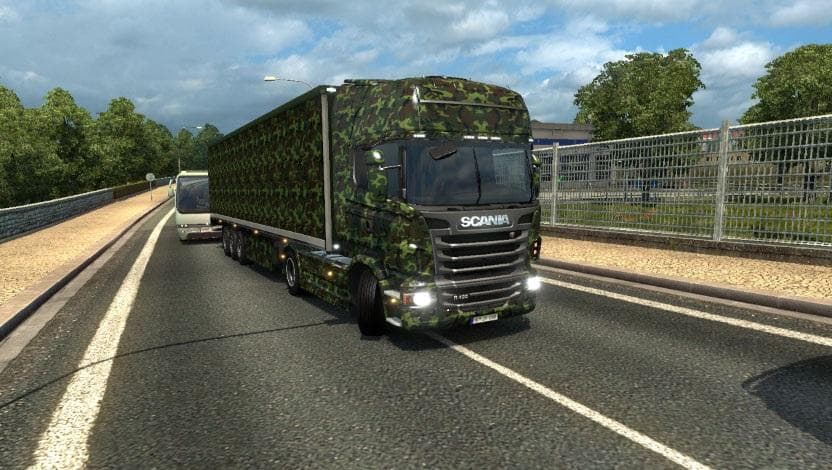
This mod is the ARMY COMBO PACK 1.21.X, a skins mod for Euro Truck Simulator 2 version 1.21. It includes army skins for all trucks and trailers, with a file siz
The ARMY COMBO PACK 1.21.X is a skin mod designed for Euro Truck Simulator 2 version 1.21. It applies a military-themed paint job to all trucks and trailers, giving your fleet a uniform army look without altering the base models themselves. This type of mod works by repainting existing vehicles in the game, which means it’s applied through the paint shop and requires compatible base vehicles to function properly.
Skin mods like this one focus solely on changing the appearance rather than adding new models or parts. They are quite popular among players who want to customize their trucks with specific themes or designs while keeping their favorite vehicle models intact. Since this pack covers both trucks and trailers, it helps maintain visual consistency across your entire convoy if you’re aiming for a military style.
When used alongside other mods, skin packs generally load without major conflicts as they only modify textures. However, it's good practice to keep skins near the end of your load order so they override any default appearances but don't interfere with gameplay mods or model replacements. Compatibility is usually straightforward unless another mod changes the same paintable areas on the same truck or trailer models.
This pack would suit players looking to add a distinctive army aesthetic to their ETS2 experience, especially those who enjoy role-playing or thematic trucking setups. Whether you're running solo or operating a modded convoy, having matching skins on both trucks and trailers can enhance immersion and give your rig a more cohesive look.
Since this skin mod is tied to ETS2 version 1.21, make sure your game matches that before installation to avoid issues. Like most skins, it should be placed in your mod folder and activated via the in-game menu where you can select it from available paint jobs for supported vehicles.
How to install
1. Download the .scs file. 2. Drop it into `Documents/Euro Truck Simulator 2/mod/`. 3. Enable in Mod Manager. 4. Apply the skin in the truck/trailer paint shop.
After the mod loads, save your game inside a safe area (parking lot or service) before deciding whether to keep it. If the game refuses to load with the mod enabled, check that all required DLCs are installed and that the supported ETS2 version chips on this page include your installed game patch.
Reviews
No ratings yetNo reviews yet — be the first to rate this mod.





