ALWAYS SNOWFALL 1.21.X
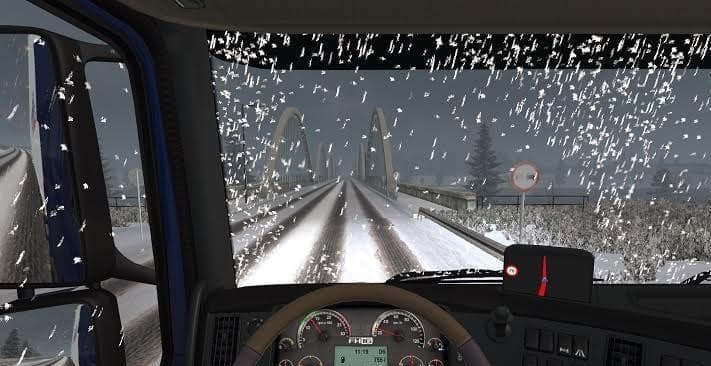
The "ALWAYS SNOWFALL 1.21.X" mod for ETS2 adds constant snowfall to the game. It requires the "Frosty Winter Weather Mod v 5.3" by grimes or another winter mod
ALWAYS SNOWFALL 1.21.X is a map-related mod designed to keep snow effects active throughout the game. It works by modifying the weather conditions so that snowfall is consistently present, enhancing the winter atmosphere in your driving environment. This mod requires a base winter weather mod like Frosty Winter Weather Mod v 5.3 to function properly, as it depends on those textures and effects to create the snowy scenes.
Map mods like this one typically alter or expand the game's world by adding new environmental features or adjusting existing ones. They come in .scs files and are sensitive to load order, meaning you should pay attention to where you place them among other mods for everything to work smoothly. Sometimes these mods also need a fresh profile or specific map DLCs installed, so check compatibility before using.
Integrating ALWAYS SNOWFALL into a heavily modded setup means ensuring it loads after any major weather or map changes that affect climate visuals. Since it modifies snowfall behavior specifically, it pairs well with winter-themed mods but may conflict with others that alter weather cycles drastically. Keeping a clean load order helps avoid unexpected visual glitches or crashes.
This kind of mod appeals mainly to players who enjoy driving through snowy landscapes year-round rather than seasonal changes. It’s useful for those wanting a constant winter feel across many regions, whether they’re exploring parts of Europe known for snow or other cold climates represented in ETS2.
If you prefer consistent snow-covered roads and want your game environment to reflect ongoing wintry conditions without waiting for seasonal triggers, this mod fits well into your collection. Just remember its dependency on compatible winter weather mods and adjust your load order accordingly.
How to install
1. Download every .scs file from the source page (map mods often ship multiple files). 2. Copy all files to `Documents/Euro Truck Simulator 2/mod/`. 3. Enable each file in Mod Manager **in the order documented by the modder**. Load order matters for maps. 4. Start a new save or use an existing save that already supports the map's base regions.
After the mod loads, save your game inside a safe area (parking lot or service) before deciding whether to keep it. If the game refuses to load with the mod enabled, check that all required DLCs are installed and that the supported ETS2 version chips on this page include your installed game patch.
Known conflicts
No conflicts reported for this mod yet. Running a big mod list? Check your whole setup for conflicts →
Reviews
No ratings yetNo reviews yet — be the first to rate this mod.





