ALCOA RIM & BASIC TIRE
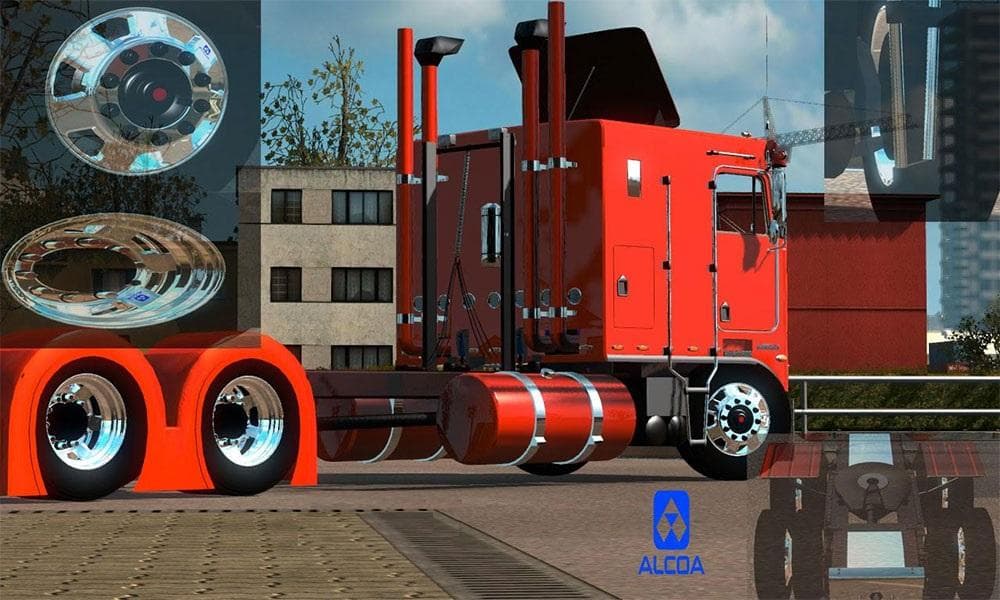
ALCOA RIM & BASIC TIRE is a parts mod for Euro Truck Simulator 2, featuring Aloca Chrome wheels and basic tires. Created by Euro Truck Simulator 2, this mod is
The ALCOA RIM & BASIC TIRE mod adds a specific wheel and tire combo to Euro Truck Simulator 2, focusing on a classic chrome rim design paired with a standard tire. This type of parts mod enhances the visual customization options available in the truck tuning menu, allowing players to tweak their vehicle’s appearance beyond factory defaults. Wheels like these fit into the broader category of parts mods, which often include accessories such as bull bars, lights, and exhausts tailored for particular trucks or styles.
In ETS2, parts mods like this one let you personalize your rig to better suit your aesthetic preferences or roleplay themes. The chrome rim style is common among players who want a cleaner, more polished look without going overboard on flashy designs. These mods usually slot in easily alongside other tuning items but should be loaded after any big truck model overhauls to avoid conflicts.
When adding wheels or tires from separate mods into your setup, it’s wise to check load order so that no changes overwrite each other unexpectedly. Since this mod targets wheels specifically, it generally won’t interfere with cabin or engine upgrades but may conflict with other rim packs if they share file paths or naming conventions. Keeping backups before installing is always recommended when mixing multiple parts mods.
This wheel and tire combo might appeal to those who enjoy subtle styling upgrades rather than extreme customizations. It fits well in setups aiming for realism while still offering some flair compared to stock options. Players who have explored American Truck Simulator might recognize similar aesthetics here, reflecting a shared appreciation for detailed truck parts across both games.
Installing this kind of mod usually involves placing its files in the ETS2 mod folder and activating it through the in-game menu. Once enabled, these wheels become selectable during vehicle customization at service stations or garages. No additional tools or configurations are typically needed beyond the standard game interface.
How to install
1. Download the file(s) from the original source linked above. 2. Drop them into `Documents/Euro Truck Simulator 2/mod/`. 3. Enable in Mod Manager and restart the game.
After the mod loads, save your game inside a safe area (parking lot or service) before deciding whether to keep it. If the game refuses to load with the mod enabled, check that all required DLCs are installed and that the supported ETS2 version chips on this page include your installed game patch.
Reviews
No ratings yetNo reviews yet — be the first to rate this mod.